How to Align Sprints Across Time Zones
Published Jun 29, 2026
⦁
11 min read

How to Align Sprints Across Time Zones
If your team spans time zones, the fix is simple: use shared hours for decisions, move updates to async, and make handoffs hard to misread.
I’d sum it up like this: sprint alignment breaks when teams treat every Scrum event like it has to happen live. It doesn’t. A better setup is to map work hours in UTC, protect the 2–4 shared hours for planning and blockers, send planning notes 24–48 hours early, and use written handoffs with exact times. That matters because off-hour meetings cut participation by 60%, and async standups can cut meeting time by 37%.
Here’s the short version:
- Start with overlap, not meetings. Find each person’s local hours, convert them to UTC, and mark the shared window.
- Use live time for decisions only. Keep sprint planning to 30–60 minutes and settle open estimates and sprint commitment, and blockers there.
- Do prep in writing. Share the sprint goal, ranked stories, capacity, and risks 48 hours before planning.
- Run daily scrums async-first. Use Slack, Teams, or short recorded updates (or an instant planning poker tool) instead of forcing one live standup.
- Rotate painful meeting times. Don’t make one region take the late-night or early-morning slot every sprint.
- Write handoffs so the next person can act right away. Include status, next step, blocker, owner, links, and an exact deadline like 10:00 AM CT Thursday.
- Set team rules. Keep questions in ticket comments, not DMs, and use a response target like 4 hours during local work time.
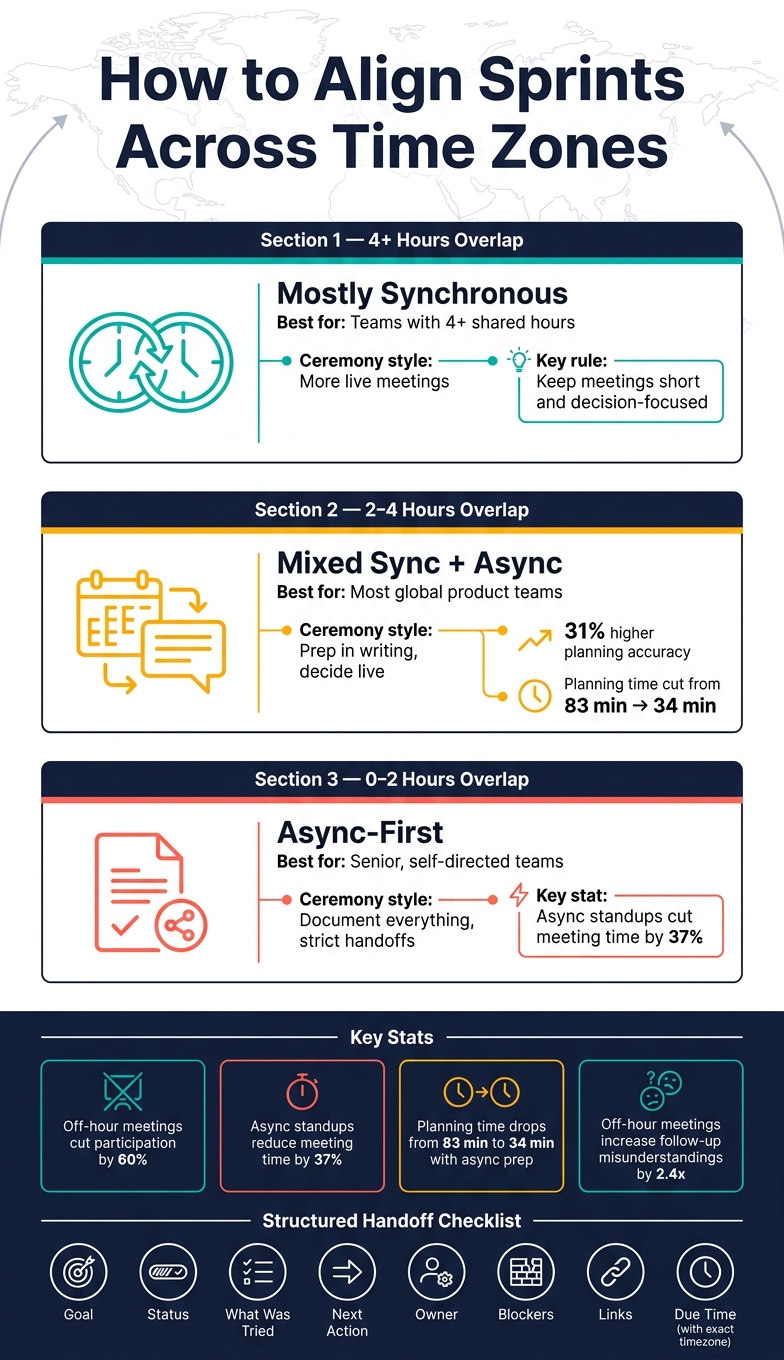
A quick way to think about it: when teams have 4+ hours of overlap, more can happen live. With 2–4 hours, a mixed model works best. With almost no overlap, the team needs an async-first system with strict written notes.
| Setup | Best ceremony style | Main rule |
|---|---|---|
| 4+ shared hours | More live meetings | Keep meetings short and decision-focused |
| 2–4 shared hours | Mixed sync + async | Prep in writing, decide live |
| 0–2 shared hours | Async-first | Document everything and use strict handoffs |
That’s the core idea: I wouldn’t try to force one office-style sprint across global teams. I’d design a sprint system around overlap, written prep, short live decisions, and clean handoffs.
Sprint Ceremony Models by Time Zone Overlap
Map Working Hours and Set Core Collaboration Windows
Collect Time Zones, Work Hours, and Time-Off Details
Start by putting each person's actual working hours, recurring absences, and local holidays into one shared sheet or wiki. Then convert every local work window into UTC so the overlap is clear right away.
Here’s how that can look for a team spread across three regions:
| Location | Local Working Hours | UTC Equivalent |
|---|---|---|
| New York | 9:00 AM – 5:00 PM | 14:00 – 22:00 |
| Berlin | 9:00 AM – 5:00 PM | 08:00 – 16:00 |
| Bangalore | 9:30 AM – 6:30 PM | 04:00 – 13:00 |
| Overlap Window | N/A | 14:00 – 16:00 (2 hours) |
That two-hour block is your shared collaboration window. Treat it like prime real estate. Use it for decisions, live problem-solving, and anything that needs back-and-forth in the moment. Don’t burn it on status updates people could post async.
It also helps to run a pre-sprint capacity check. Share PTO, on-call coverage, and holiday plans 48 hours before sprint planning. You can also estimate stories online during this window to keep the session moving quickly. That way, sprint planning is based on what the team can actually do, not what people assume they can do. Once the core window is set, keep it open for the small number of meetings that need everyone there at the same time.
Pick a Primary Sprint Time Zone and Rotate Inconvenient Meetings
Once you know the overlap, turn it into a simple scheduling rule. Set sprint dates and ceremony notes in one primary time zone, then show each local conversion next to it so nobody has to do mental math during the workday.
When the shared window falls outside someone’s normal hours, things start to slip. Meetings in those off-hours reduce engagement by 52% and increase follow-up misunderstandings by 2.4x. That’s a steep cost. The answer isn’t to cancel every awkward meeting. It’s to share the pain.
Rotate the early-morning or late-evening slot monthly or quarterly across regions so one group doesn’t keep paying the time zone tax. Even a one-hour shift can create more overlap. If you need that extra hour, move start or end times by an hour and rotate that burden each sprint.
For deadlines, be exact. Write the time and the time zone every single time - for example, “by 10:00 AM CT Thursday” - so no one misreads it and loses a full day of work.
Managing Distributed Scrum Teams: Time Zone Challenges

Run Sprint Ceremonies With a Mixed Sync and Async Model
Use your overlap window for live decisions only. Push the rest into async work. That simple shift changes the whole rhythm of sprint ceremonies: prep happens in writing, the meeting is for decisions, and follow-up goes back into shared docs.
Split Sprint Planning Into Prep, Live Decisions, and Follow-Up
Sprint planning works better when it has three clear parts: prep, live decisions, and follow-up.
48 hours before the session, the Product Owner should publish a planning packet with the proposed Sprint Goal, ranked stories with acceptance criteria, capacity assumptions, and known risks. Engineers can review it on their own schedule, add questions in comment threads, and do early estimation async. That way, people walk into the live session with context instead of spending half the meeting getting up to speed.
During the shared overlap window, keep the live block short - about 30 to 60 minutes - and place it inside the team’s shared collaboration window. Use that time only for the issues that don’t get settled well in writing: uncertain estimates, blockers that are still open, and the final commitment to the Sprint Goal. Teams that use this setup cut average planning time from 83 minutes to 34 minutes.
After the session, update tickets to match what was decided live, split stories that are too large, and post a written recap for anyone who missed it. Put sprint dates in every shared doc using one clear format - for example, July 6, 2026–July 17, 2026 - so nobody has to guess what the timeline means in another region.
"Decisions made without half the team present are decisions made against half the team. They get reopened later." - PanDev Metrics
Once you break planning into these parts, the same pattern carries over to daily scrums, reviews, and retrospectives.
Adapt Daily Scrums, Reviews, and Retrospectives for Limited Overlap
Move daily scrums async first. Written updates in Slack or Teams - or short recorded video clips posted at the start of each person’s local day - can take the place of a live standup. GitLab found that switching to asynchronous standups cut total meeting hours by 37%. That gives your overlap time back for blockers and decisions.
Sprint reviews need a bit more structure. For distributed teams, two setups tend to work well:
- Record the demo, then let stakeholders in other time zones send written feedback within 48 hours
- Run two shorter, matching review sessions for different time zone groups - for example, one for APAC and EMEA, and another for the Americas
Both options help people stay involved without dragging them into a midnight call.
Retrospectives also work better with async prep and a short live session. Collect retro board items before the meeting, then use the live time for voting and choosing action items. That keeps the conversation tight and stops the retro from turning into a long download of things people could have written earlier.
Scheduling Models for Global Ceremonies: A Comparison
There’s no one-size-fits-all setup here. The best model depends on how much overlap your team actually has.
| Model | Advantages | Disadvantages | Best Fit |
|---|---|---|---|
| Fully Synchronous | High immediate clarity; strong social bonds | Burnout risk; participation asymmetry for off-hour zones | Teams with more than 4 hours of overlap |
| Mixed (Sync/Async) | Keeps shared overlap hours for decisions; 31% higher planning accuracy | Requires high documentation discipline | Most global product teams with 2–4 hours of overlap |
| Primarily Asynchronous | Zero timezone bias; permanent searchable records | Slow decisions; harder for complex problem-solving | Senior, self-directed teams on well-defined workstreams |
Pick the model that fits your overlap, then keep each ceremony tight, specific, and hard to misread.
Coordinate Handoffs and Keep Work Moving Between Regions
When overlap ends, handoffs are what keep work from grinding to a halt. If one region signs off and the next team starts cold, a task can sit untouched for a full day. That’s how a time gap turns into idle time.
Use Structured Handoffs for Follow-the-Sun Work
Follow-the-sun works best for support, operations, QA, urgent defects, and on-call work. It’s a poor fit for feature work that needs people talking in real time.
For collaborative stories, keep ownership in one region and use the overlap window to clear blockers live. If you do need a handoff, write it so the next person can act without asking follow-up questions. Skip vague phrases like "end of day." Use exact deadlines with time zones instead, like "by 10:00 AM Central on Thursday".
A solid handoff should cover:
- the goal
- current status
- what’s been tried
- next action
- owner
- blockers
- links
- due time
For more complex changes, a short screen recording can help fill in the gaps that text may miss.
"If a decision is not written down, it will be rediscovered at the worst possible time." - ITU Online Editorial Team
Another way to cut down on handoffs is to organize work into feature pods, where one region owns a story from design to release.
Handoff Intensity by Coordination Cost: A Comparison
The right handoff pattern depends on the type of work and how much coordination your team can handle without slowing down.
| Handoff Intensity | Coordination Effort | Impact on Cycle Time | Context Switching | Best For |
|---|---|---|---|---|
| Minimal Handoffs | Low | High | High | Independent, low-priority tasks |
| Daily Structured | Medium | Medium | Low | Standard sprint stories and feature work |
| Continuous Follow-the-Sun | High | Low | Low | Urgent defects, QA, and 24/7 operations |
Once handoffs are standardized, the next move is to set communication and estimation rules so teams handle them the same way every time.
Tools, Estimation Practices, and Team Rules That Keep Distributed Sprints on Track
Set Clear Rules for Communication, Documentation, and Response Times
Once handoffs are set, the next move is simple: set clear rules for how the team asks questions, answers them, and records decisions.
This matters because handoffs fall apart fast when people rely on guesswork. If one person drops a question in a DM, another puts context in Slack, and a third logs the final call in a ticket, the team loses time just trying to piece the story together.
A simple rule helps: keep questions in ticket comments, not DMs.
You also need response-time rules so work doesn't sit idle. A 4-hour response target for non-urgent questions during work hours gives people a shared expectation, and an escalation path covers urgent issues.
Pair that with a planning packet sent 24–48 hours before Sprint Planning. That gives people time to review work on their own schedule before the live session starts. The payoff can be huge: async prep cuts live planning from 83 minutes to 34 minutes.
Use iAmAgile for Async Sprint Estimation
That kind of response rhythm makes blind async estimation much easier to run.
Use iAmAgile to gather blind estimates asynchronously, then use the overlap window for outliers and final commitment. It keeps the session focused on the few items that need discussion instead of dragging the whole team through every ticket.
A few things make it fit this workflow well:
- Slack integration keeps planning in one place
- Mobile access lets people estimate while away from their desks
- Customizable voting scales match the team's estimation approach
Conclusion: Build a Repeatable Time Zone Sprint System
Distributed sprints stay on track when overlap, ceremonies, handoffs, documentation, and estimation all follow the same rules.
The teams that do this well don't treat distributed work like a problem to patch meeting by meeting. They treat it like a system to design with care. That shift changes everything. Instead of a messy chain of workarounds, the team gets a repeatable operating rhythm.
FAQs
How do I choose the right sprint model for my team’s overlap?
Start by mapping your actual overlap window: the stretch of time when everyone is working normal hours. Once you have that, pick a model that matches how your team is spread out. If people are scattered across the globe, a rotating schedule often makes sense. If most of your talent sits in a few time zones, regional squads can be a better fit.
From there, run an async-first workflow. Do the pre-work async 24 to 48 hours in advance, hold a 30- to 60-minute live sync, and then wrap things up async afterward. That setup helps you use live time for the parts that need discussion instead of burning it on prep. Tools like iAmAgile can help with async estimation and keep your overlap window from getting eaten up.
What should a good cross-time-zone handoff include?
A good cross-time-zone handoff needs to be deliberate, not accidental.
It should clearly say:
- what was finished
- what comes next
- any blocked decisions
- where the relevant files and links live
Make ownership explicit too. Name the person responsible until the next handoff so there’s no confusion about who’s on point.
Keep updates concise, ideally short enough to fit on one screen. And use 15- to 30-minute overlap windows to confirm details and clear up ambiguity, not to give status reports.
When should daily standups stay live instead of async?
For distributed teams, daily standups should usually be async. That way, you protect the limited overlap time your team has and use it for work that’s better done together.
Written updates help in a couple of ways. They create a searchable record, and they let people reply when it fits their schedule instead of forcing everyone into the same meeting.
Keep standups live only when the conversation is more complex and needs real-time back-and-forth, like clearing blockers or getting alignment on a decision.
Ready to improve your team's planning?
Put what you've learned into practice! Make your next planning session more engaging and accurate.
Try for free - no signup required