Capacity Planning for Scrum Teams: 2025 Guide
Published Jun 15, 2026
⦁
11 min read

Capacity Planning for Scrum Teams: 2025 Guide
If I want a sprint plan I can trust, I start with time, not hope. The article’s main point is simple: I take each person’s actual availability, subtract meetings, PTO, holidays, on-call work, and support time, then use a focus factor of 60% to 80% to estimate how much sprint work the team can finish. From there, I scale recent velocity to match that availability and commit to only 80% to 95% of that amount.
Here’s the whole article in plain English:
- I treat capacity as the team’s usable sprint time after time off and overhead.
- I use velocity as a past baseline, not as a promise for the next sprint.
- I can plan in hours, days, or story points, but many teams use hours for availability and story points for delivery.
- I watch cycle time, throughput, WIP, and carryover to see if the plan is too full.
- I adjust for new hires, shared specialists, bugs, and support work, which often take 15% to 20% of team time.
- I leave extra room when someone is on call, since that can cut one person’s output by up to 50%.
- I use a repeatable checklist each sprint so planning stays steady.
- I get better results when I plan with a range, not one fixed number.
A fast way to think about it: if the team has only 85% of normal availability, I should not plan for 100% of normal output. And if the team keeps committing above 105% of capacity, that usually points to overcommitment, not ambition.
Quick comparison
| Topic | What I use it for | What the article says |
|---|---|---|
| Capacity | Next sprint limit | Based on actual available time |
| Velocity | Past delivery baseline | Often a rolling average of the last 3–5 sprints |
| Focus factor | Convert raw time into usable sprint time | Often 0.6 to 0.8 |
| Buffer | Protect sprint work from interruptions | Often 10% to 20% |
| Commitment target | Final sprint scope | Usually 80% to 95% of adjusted capacity |
If I keep the math simple and review it every sprint, capacity planning becomes a plain forecasting habit instead of a guessing exercise.
Calculate Scrum Team Sprint Capacity: A Simple Step by Step Guide for Beginners & Experts Alike!
Core Metrics and Capacity Planning Models
Once you know availability, the next step is picking the metric that turns that time into a sprint plan. Sprint planning usually comes down to four inputs: capacity, velocity, focus factor, and the gap between working days and calendar days.
Capacity is the sprint limit. Velocity is the recent delivery baseline, often a rolling average from the last 3–5 sprints. Focus factor is the multiplier that converts raw availability into productive hours, and for software teams it often falls between 60% and 80%. In a two-week sprint, you usually start with 10 working days. Then holidays, ceremonies, and support work chip away at that total.
Hours, Days, and Story Points: Choosing a Planning Unit
Pick the unit that fits the team’s maturity, the kind of work it does, and how much history you have.
| Planning Unit | Advantages | Disadvantages | Best-Fit Use Case |
|---|---|---|---|
| Hours | High precision; good for new teams without history | Risk of micromanagement; time-consuming to track | New teams or high-interruption environments |
| Days | Simple to calculate; easy to visualize PTO and holidays | Less precise than hours; doesn't account for the focus factor within a day | Quarterly planning or teams with very large, uniform work items |
| Story Points | Focuses on effort and complexity; faster to estimate | Abstract; requires historical data to be useful | Mature teams with stable velocity and consistent sprint lengths |
A lot of teams mix units on purpose. They use hours or days to measure availability, then use story points to forecast delivery.
That choice sets the upper limit. But it doesn’t tell you whether the team can keep that pace sprint after sprint.
Flow Metrics That Support Sprint Planning
Flow metrics help answer that part. They show whether the plan works in practice or just looks fine on paper.
Cycle time tracks how long each item takes to finish. Throughput counts how many items the team completes in a sprint, which is handy when work is getting smaller and more uniform. WIP limits stop the team from starting more work than the system can handle, which cuts down on excess multitasking. Carryover is another signal to watch. If work keeps rolling into the next sprint, capacity may have been set too high, or the items may not have been refined enough before planning.
"Capacity planning is not about filling calendars or counting resource hours. It is about flow, system constraints, and predictability." - Martin Hinshelwood, Principal Consultant, naked Agility
Healthy sprints usually land between 80% and 95% of capacity. If the team keeps pushing above 105%, that’s a sign of overcommitment.
With those metrics in place, the next step is turning them into a sprint capacity range.
How to Calculate Sprint Capacity Step by Step
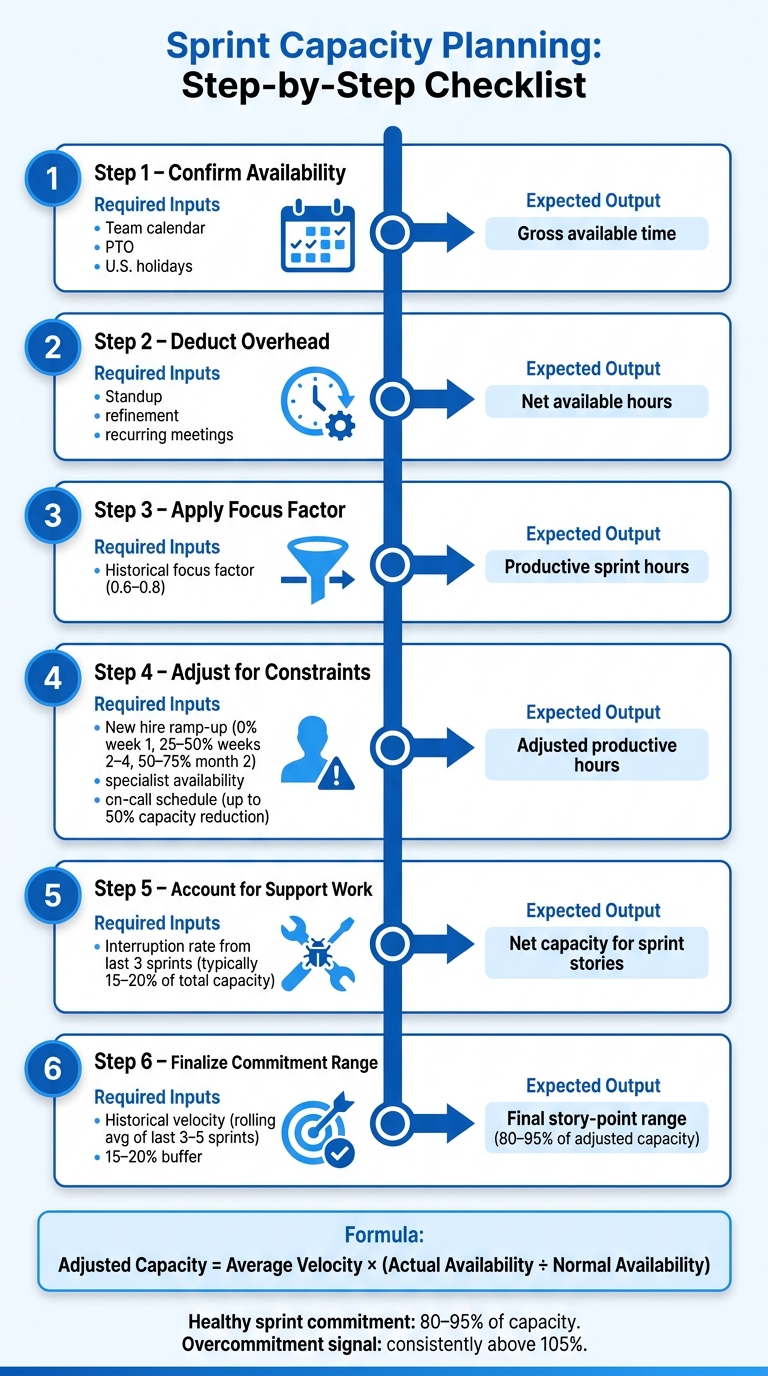
Sprint Capacity Planning: Step-by-Step Checklist for Scrum Teams
From Team Availability to a Final Capacity Range
Start with the team's actual working time for the sprint. Look at each person's schedule and subtract PTO, U.S. holidays, and any other planned time off. What you have left is gross available time.
Next, apply the team's focus factor. For most teams, that sits between 0.6 and 0.8. This turns gross time into the hours people can spend on sprint work.
From there, convert that adjusted capacity into a story-point commitment range. Use this formula: Adjusted Capacity = Average Velocity × (Actual Availability ÷ Normal Availability). So if the team's availability this sprint is 85% of normal, scale the velocity target down to match. Then set the sprint commitment range at 80–95% of that adjusted number.
Adjusting for Specialists, New Hires, and Unplanned Work
Raw availability never tells the whole story. A team may look open on the calendar and still have less room than expected.
New hires are the clearest example. Their output usually ramps up in stages: 0% in week one, 25–50% in weeks two through four, and 50–75% in month two. There's also a hidden cost here. The person helping them onboard loses time too, and that should come out of the team's total before planning.
Specialists can also limit the sprint. A single UX designer, a shared security engineer, or a senior architect may become the bottleneck, even if the rest of the team has time left. Spot those roles before planning and cap the sprint based on what they can realistically handle.
You should also leave room for bugs and urgent support. A simple way to do that is to use the interruption rate from the last three sprints as a buffer. For most teams, that lands around 15–20% of total capacity. And if someone is on call, treat that separately. An on-call rotation can cut one person's effective capacity by as much as 50% during that sprint.
Sprint Capacity Planning Checklist
Use this checklist in the same order each sprint so the math stays consistent.
| Step | Required Inputs | Expected Outputs |
|---|---|---|
| 1. Confirm availability | Team calendar, PTO, U.S. holidays | Gross available time |
| 2. Deduct overhead | Standup, refinement, recurring meetings | Net available hours |
| 3. Apply focus factor | Historical focus factor (0.6–0.8) | Productive sprint hours |
| 4. Adjust for constraints | New hire ramp-up, specialist availability, on-call schedule | Adjusted productive hours |
| 5. Account for support | Interruption rate from the last 3 sprints | Net capacity for sprint stories |
| 6. Finalize commitment range | Historical velocity, 15–20% buffer | Final story-point range (80–95% of capacity) |
Use this checklist at every sprint planning session. For more expert perspectives on team workflows, explore our Agile insights blog. It gives the team a steady starting point before you layer in ranges and confidence levels for more advanced planning.
Advanced Capacity Planning Practices for 2025
Using Ranges, Confidence Levels, and Smaller Work Items
The checklist gives you a starting point. Advanced planning takes that starting point and turns it into a confidence range. That range should act as a band, not a hard target.
One simple shift helps a lot: break stories into 1–8 hour tasks so hidden complexity shows up before planning begins. That early view cuts down on nasty mid-sprint surprises. It also helps to keep the top 10–15 backlog items INVEST-compliant - Independent, Negotiable, Valuable, Estimable, Small, and Testable - before the planning session starts.
Retrospectives are where the team tightens the process. Track commitment accuracy with this formula: completed points ÷ committed points. When you measure that sprint after sprint, missed commitments stop being random misses and start becoming calibration data. Mature teams usually aim for 85–95% commitment accuracy as a steady-state target.
Capacity Planning Across Multiple Teams and Quarterly Cycles
Once specialists are shared across teams, capacity planning stops being just a team-level exercise. It becomes a system problem. Shared roles like UX, security, or operations can create bottlenecks that no single team can fix on its own.
A practical move here is to apply WIP limits at the product level so demand on shared specialists does not pile up across teams. For quarterly cycles, make the split between feature work, tech debt, and support visible in the plan. That makes it easier for leadership to check whether time and budget are lining up with the roadmap.
Advanced planning also helps teams spot external dependencies early. If capacity changes, the team can adjust its commitment range before the plan starts to slip.
Basic vs. Advanced Capacity Planning: A Comparison
The table below shows where the two approaches split and when each one makes sense.
| Feature | Basic Capacity Planning | Advanced Capacity Planning |
|---|---|---|
| Primary metric | Raw velocity or hours | Adjusted velocity and focus factor |
| Commitment style | Fixed number of points | Range-based: 80–95% of capacity |
| Unplanned work | Often ignored or padded into estimates | Explicitly deducted as a support allocation |
| Item granularity | Large user stories | Small, refined tasks of 1–8 hours |
| Specialists | Counted as full-time resources | Modeled at reduced capacity (e.g., ~30% for tech leads) |
| Feedback loop | End-of-project review | Sprint-by-sprint retrospectives and commitment accuracy tracking |
Basic planning works fine as a starting point. Advanced planning is what helps teams stay predictable when work gets more complex and delivery pressure goes up. These rules tend to work best when the estimation workflow stays fast and repeatable.
Tools, Estimation Workflows, and Key Takeaways
How Estimation Tools Support Capacity Planning
Capacity planning works best when estimation and team availability sit in the same workflow. That means using the same inputs from your capacity calculation inside the tool itself: availability, focus factor, and interruption buffer.
iAmAgile supports Scrum poker with real-time voting, Slack integration, customizable scales, and mobile access.
| Activity | Supporting Practices | Tools |
|---|---|---|
| Backlog Estimation | Planning Poker, breaking work into smaller items, INVEST check | iAmAgile (Scrum Poker, Slack integration, mobile access), digital boards |
| Sprint Planning | Velocity tracking, availability grids, focus factor adjustment | iAmAgile (customizable voting scales), spreadsheets |
| Mid-Sprint Re-planning | WIP limit review, burndown monitoring, buffer management | Kanban boards, burndown charts, spreadsheets |
The main idea is simple: don't estimate in one place and plan capacity in another. When those steps are split, teams end up juggling numbers, making side calculations, and losing time.
Keeping Capacity Planning Lightweight and Repeatable
Once the team shares one estimation workflow, keep the planning ritual short. The biggest risk in capacity planning is turning it into extra process for its own sake. Sprint planning is timeboxed to 8 hours for a one-month sprint. But that doesn't mean you should use all 8 hours. Stop when the capacity review is finished.
Two habits help keep things lean:
- Survey the team 1–2 days before planning with a simple availability grid. Ask about PTO, conferences, or production support duties so the numbers match what's actually going on.
- Review planned vs. actual capacity in every retrospective. That check gives the team a grounded way to adjust the focus factor for the next sprint.
If team makeup changes or the type of work shifts in a big way, reset the focus factor before the next sprint starts. Don't wait for the numbers to drift and then try to explain the miss after the fact.
Conclusion: What Good Capacity Planning Looks Like
With the workflow in place, the last step is consistency.
Good capacity planning uses clear capacity, historical velocity, real availability, and a 10% to 15% buffer. When teams do this sprint after sprint, they get a plan they can trust - one based on actual capacity, not guesswork.
FAQs
How do I choose the right focus factor for my team?
Use your team’s past sprint velocity and capacity to work out a realistic focus factor. In many teams, it lands between 0.6 and 0.8, and 0.75 is a solid starting point for teams that have settled into a steady rhythm.
Then adjust that number based on what’s happening right now: holidays, meetings, interruptions, and how experienced the team is working together. Check it often against recent sprint data so it stays grounded in what the team can actually do.
When should we plan in hours instead of story points?
Plan in hours when you assess team capacity based on available working time.
Why? Because hours give you a more honest view of what the team can take on. They help you account for meetings, holidays, and time off before anyone commits to a workload that looks fine on paper but falls apart in practice.
A simple way to think about it: a five-day week is not always 40 working hours for every person. Once you subtract internal meetings, PTO, company holidays, and other time blocks, the number can shrink fast.
When teams plan this way, they make workload commitments that are more realistic and easier to stick to.
How often should we update our capacity planning model?
Update your capacity planning model on a regular schedule - ideally every sprint, or at least at the same point in your sprint rituals.
That keeps the model accurate and in line with your team’s current availability and workload.
Ready to improve your team's planning?
Put what you've learned into practice! Make your next planning session more engaging and accurate.
Try for free - no signup required