Steps to Turn Retrospective Feedback into Actionable Tasks
Published Jul 13, 2026
⦁
11 min read
Steps to Turn Retrospective Feedback into Actionable Tasks
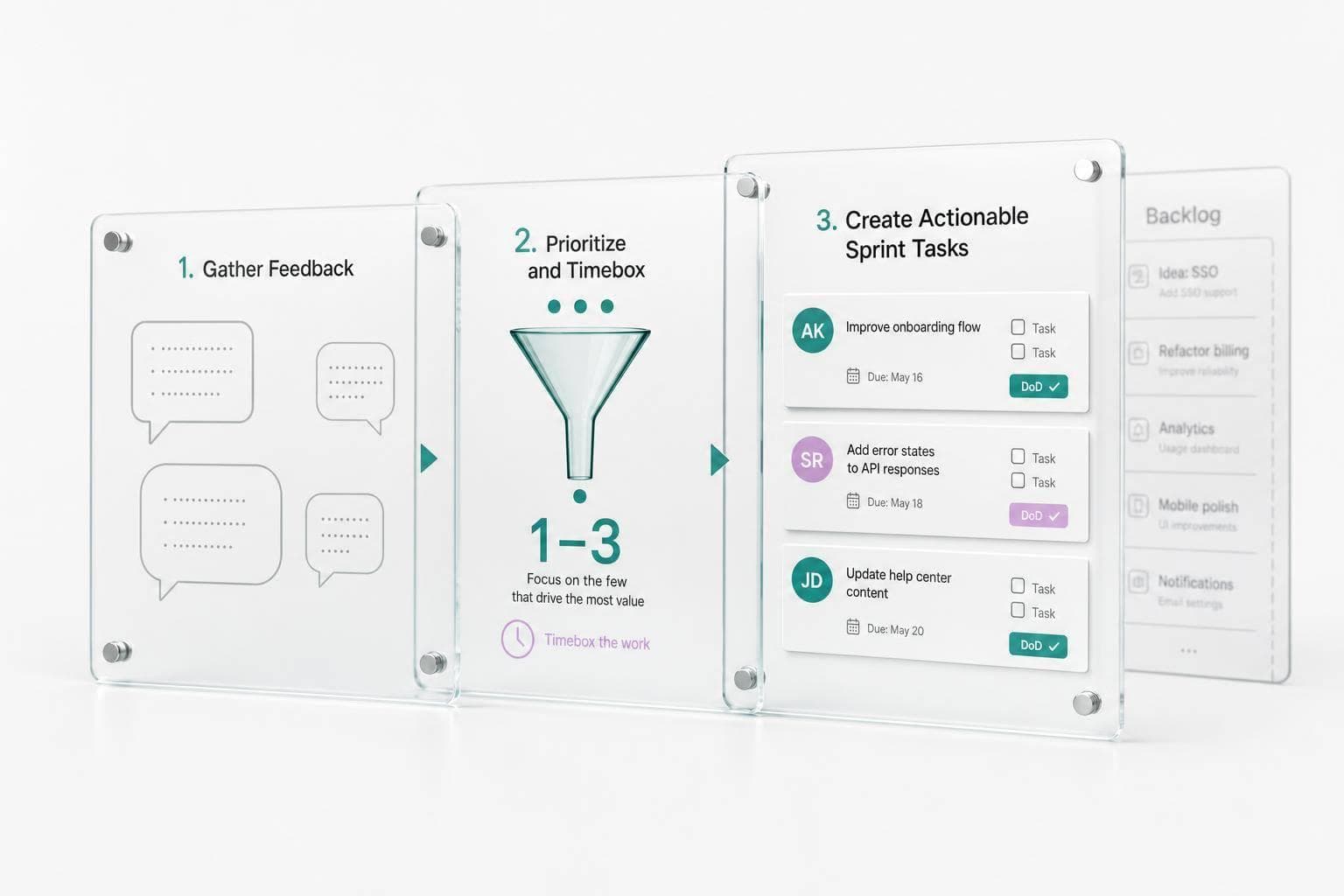
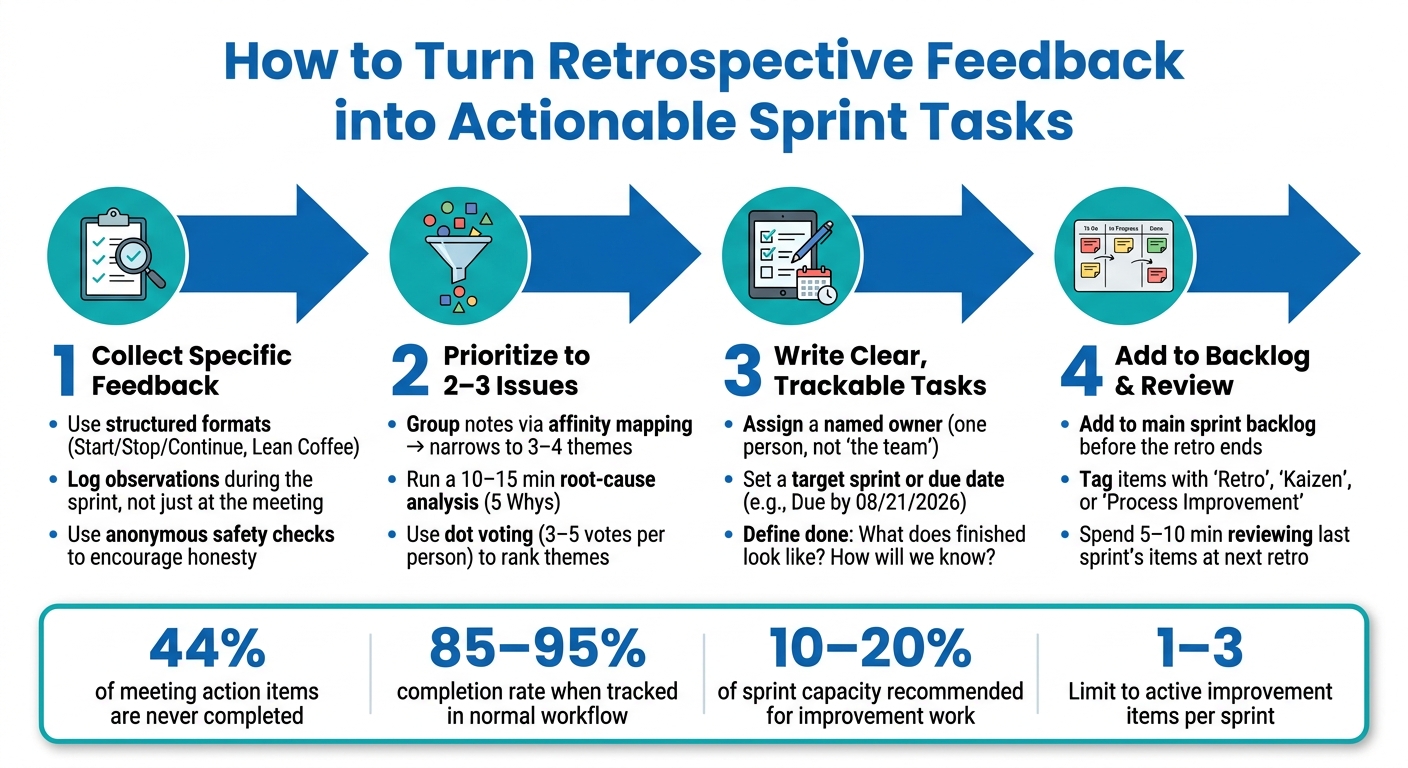
Most retro action items die because they never become sprint work. If I want feedback to lead to change, I need to do four things: collect specific input, cut it down to 2–3 issues, turn each one into a small task with an owner and due date, and review it in the next sprint.
Here’s the short version:
- I start with clear feedback, not vague complaints
- I group similar notes and find the root cause
- I pick only 1–3 improvement items for the sprint
- I write each item so the team can estimate, assign, and finish it using planning poker
- I track it in the main backlog, not in a forgotten notes doc
- I review whether it was done and whether it helped
A few numbers stand out:
- Teams often reserve 10–20% of sprint capacity for improvement work
- Dot voting usually narrows feedback to 3–4 main themes
- A short root-cause review can take 10–15 minutes
- Reviewing last sprint’s action items takes just 5–10 minutes
- About 44% of meeting action items are never finished, but tracked items can reach 85–95% completion
At a basic level, the process is simple: move from what happened, to why it happened, to what we will do next sprint. That means each action item needs a named owner, a time frame, and a clear definition of done.
This article explains how I’d make that shift without turning the retro into extra admin work.
How to Turn Retrospective Feedback into Actionable Sprint Tasks
3 Ways To Complete Action Items After A Retrospective
1. Prepare retrospectives to collect usable feedback
A retrospective is only as good as the input behind it. If the team wants output that leads to root causes and clear tasks, it needs input that is specific, honest, and easy to work with.
Start by setting working agreements. Then open with a quick check-in so people can settle into the conversation. If the team seems hesitant to speak openly, use an anonymous safety check. That small step can make a big difference. It gives people room to be candid without feeling exposed.
It also helps to keep the discussion centered on issues the team can actually change. Otherwise, the meeting can drift into complaints with nowhere to go. A structured format keeps things grounded and makes it easier to sort feedback into patterns instead of ending up with a pile of random comments.
Use a structured format to spot patterns
Formats like Start/Stop/Continue put feedback into clear buckets. Lean Coffee lets the team vote on topics and talk about the most important ones first.
That structure matters. Grouped notes are much easier to scan than scattered observations, and patterns tend to show up faster. Once the team sees the same issue pop up more than once, it becomes much easier to turn that issue into a task.
Collect feedback during the sprint, not only at the meeting
Don’t wait until the retrospective to remember what happened. Capture observations during the sprint in a shared channel or board so people can log them while details are still fresh.
That way, the retrospective starts with specific notes instead of vague memories. It also makes prioritizing much faster because the team is working from concrete examples, not trying to reconstruct the sprint on the spot.
Estimate improvement work during planning with iAmAgile
Agile practitioners generally recommend reserving 10–20% of sprint capacity for improvement work and treating those items like any other backlog task - with a point estimate, a clear owner, and a place in sprint planning.
Estimate improvement tasks during planning with iAmAgile’s Scrum poker, Slack integration, customizable voting scales, and mobile access so the team treats them like actual sprint work. When improvement work is estimated alongside the rest of the sprint, it’s less likely to get pushed aside.
2. Prioritize feedback before writing tasks
After you cluster the retrospective notes, cut the list down to the few issues worth acting on. Not every comment from a retrospective should land in the backlog. The goal is to leave the board with 2–3 high-impact issues the team can finish in the next sprint.
Group similar feedback and find the root cause
Start with a short affinity mapping exercise. Group related notes by theme. For example, waiting on code reviews and idle PRs usually point to the same problem: a slow review cycle. In most cases, this trims the list down to 3–4 themes.
Once those themes are on the board, spend 10–15 minutes on root cause analysis before turning anything into tasks. A simple 5 Whys exercise works well. For example: Why are reviews slow? Reviewers are overloaded. Why? Only senior engineers review. Why? There are no shared standards to safely involve others. Now you're looking at a problem the team can fix.
When the issue under the issue becomes clear, rank the themes before writing tasks.
Vote on the issues that matter most
After clustering and root-cause review, vote on the themes that matter most. Dot voting is a fast way to rank them. Give each person 3–5 votes and ask them to use those votes on the themes with the biggest sprint impact. The themes with the most dots become the first shortlist.
Then run a quick filter on the top items:
- How much impact does this have on delivery?
- How urgent is it?
That quick check helps the team stay locked on the issues most likely to improve delivery. Keep the final list to 3–4 issues at most.
Set one improvement goal for each selected issue
Once the team picks an issue, define the outcome before drafting work. Before writing a single task, be clear about what success looks like for each priority. Use this pattern: By the end of next sprint, improve X from A to B.
For example, you might reduce average code review turnaround from 3 days to 1 day for most pull requests. Or you might shorten QA handoff delays so stories spend less than 8 hours waiting for testing after development is done. If exact numbers aren't available yet, rough numbers are fine. The point is to set direction, not chase perfect precision.
3. Turn prioritized feedback into clear, trackable tasks
Once you've picked the top issues and set improvement goals, the next step is to turn each issue into a task the team can actually do in a sprint. The goal from the previous step becomes the yardstick for success.
Turn ideas into small experiments the team can test
Take the issue you selected and turn it into one concrete experiment the team can try in the next sprint.
A good place to start is with a plain problem statement. For example: Stories frequently carry over because acceptance criteria are not clarified early enough. Then give the team 5–10 minutes to brainstorm actions they could try in the next sprint. Write down a few options first. That small pause helps the team avoid jumping to the first idea.
From there, choose one experiment that fits inside a single sprint. Keep it within the team's control. Skip fuzzy tasks like "communicate better" and go for something you can see and check. For example: create and apply a standard acceptance-criteria checklist to all new stories in Sprint 12, then review its usage in the next retrospective.
Write the task as a checklist or task card so it's easy to follow and track.
Define done, ownership, and timing
Before any task goes into the backlog, it needs three things:
- A named owner
- A target sprint or due date
- A clear definition of done
Don't assign the whole team. Assign one person or a pair. One person should be on the hook for creating the task, moving it forward, and calling out blockers early. For example: Owner: Jordan; backup: Priya.
For timing, tie the task to a specific sprint. Add a due date in month/day/year format when that helps, such as Due by 08/21/2026. Then write a definition of done that spells out what must be true for the task to count as finished, not just started. For example: Done when the checklist is documented, used on every Sprint 12 story, and reviewed in the Sprint 12 retro.
Before the task enters the backlog, the definition of done should answer two simple questions: What does finished look like? and How will we know it happened?
Compare strong and weak action items
Strong action items are clear, measurable, owned by someone, tied to time, and small enough to test in one sprint. That's the standard to use before anything lands in the backlog.
| Aspect | Strong Action Item | Weak Action Item |
|---|---|---|
| Specificity | Create and apply a standard acceptance-criteria checklist to all new stories in Sprint 12. | Improve user story quality. |
| Measurability | At least 80% of stories in Sprint 12 use the checklist, and QA reports fewer clarification-related defects. | Improve testing before releases. |
| Ownership | Owner: Jordan; backup: Priya. | Owned by the team. |
| Timeline | Due by 08/21/2026. | No deadline. |
| Sprint testability | Can be fully tried in Sprint 12; results reviewed at Sprint 12 retrospective. | Depends on outside teams and may take multiple sprints. |
If the team can't answer Did we complete this? and Did it make a difference? in the next retrospective, the task still isn't clear enough for the backlog.
4. Add action items to the backlog and follow through
Once the team agrees on an action item, put it where the work already happens. A retro action item only counts if it makes its way into the sprint backlog and stays in view until the team reviews it again. Research shows that 44% of action items from meetings are never completed. But that rate can jump to 85–95% completion when teams track actions inside their normal workflow. So treat improvement work the same way you treat sprint work.
Turn each agreed action item into a backlog item before the retrospective meeting ends. Not the next day. Add clear ownership and a sprint due date right away. That keeps the commitment visible until the next retrospective. Estimate it during planning so it has to compete with feature work. And tag each improvement ticket with a label like "Retro", "Kaizen", or "Process Improvement" so the team can filter and report on it without moving it off the main board. Use iAmAgile Scrum poker to estimate improvement tasks alongside feature work.
Add improvement work to the backlog with clear effort and visibility
Adding an improvement item usually means something else gets pushed back. That tension is normal, and it helps the team make tradeoffs in plain sight. When improvement work is estimated next to feature work, it's less likely to disappear the moment the sprint gets crowded.
Review progress and check whether the change worked
At the start of every retrospective, spend 5–10 minutes reviewing last sprint's action items. For each one, ask two simple questions: Was it completed? and Did it help? Check the result against the goal set when the item was written. If it stalled, break it into a smaller piece or drop it.
During the sprint, review improvement tasks in standup just like any other item. Use simple before-and-after measures tied to each action item - like cycle time, defect rate, or a quick 1–5 team satisfaction rating - so the next retrospective has something concrete to talk about.
Pick one tracking method the team will use consistently
Use the lightest tracking method that still keeps action items visible and reviewed. Pick one before the sprint starts.
| Tracking Method | Use Case |
|---|---|
| Tags in the main backlog | Improvement items stay with feature work. |
| Dedicated improvement board | Best for clear improvement-work visibility. |
| Simple spreadsheet | Best for lightweight tracking. |
Small or newer teams often do well with a spreadsheet and a recurring calendar reminder to review it in each retrospective. Larger or distributed teams usually get more mileage from tags in their existing agile tool so everything stays in one place. Whatever method the team picks, keep active action items to 1–3 at a time. Fewer items usually means better completion rates and less context switching.
Conclusion: Keep the feedback loop short and visible
Once action items land in the backlog, the last step is simple: keep the loop short. Gather specific feedback, sort the biggest issues first, turn them into small tasks with a clear owner, and track them until the next retrospective closes the loop.
Improvement work gets done when it’s estimated, assigned, and kept on the same board as feature work. That shared view changes the next retrospective. Instead of repeating old promises, the team reviews what actually happened.
Limiting active improvement items to 1–3 per sprint keeps the work under control and makes it easier to see if a change helped. One finished improvement teaches more than five half-done ones.
When people see their feedback become a real backlog item, a named owner, and a result reviewed in the next sprint, retros stop feeling like a formality. Trust grows. And retrospectives become part of steady improvement instead of a box-checking meeting. When feedback turns into visible work, retrospectives stay useful.
FAQs
How do I choose which retro issues to act on first?
Prioritize retrospective issues using the data from your sprint, not gut feel. Look at metrics like efficiency score, blocker patterns, and velocity trends to spot the problems that are slowing the team down the most.
Start with recurring bottlenecks and any issue that directly affects your team’s ability to meet commitments.
What makes a retrospective action item actionable?
A retrospective action item only works when it becomes part of the team’s main workflow instead of sitting off to the side as a separate task. That’s where many teams get stuck: the item comes out of the retro with good intentions, then quietly fades because it isn’t tied to day-to-day work.
To improve follow-through, make each task clear, assign an owner, and track it in the same system the team already uses for regular project work. iAmAgile can help keep the team aligned during planning and estimation, so those retro insights turn into manageable next steps.
How can I make sure retro action items get finished next sprint?
Bring retrospective action items into the team’s main workflow instead of handling them off to the side. That makes them part of the actual work, not a “we’ll get to it later” list.
Look back at the last sprint’s story points and blockers to spot patterns. If similar items kept getting delayed, there’s usually a reason, and that pattern is worth paying attention to.
In the next planning session, prioritize those actions right alongside user stories so they get the time and support they need. Tools like iAmAgile can help with real-time collaboration in Slack, which makes it easier for the team to stay aligned on commitments and estimate improvement tasks in a consistent way.
Ready to improve your team's planning?
Put what you've learned into practice! Make your next planning session more engaging and accurate.
Try for free - no signup required