Slack Poker for Remote Teams
Published Oct 19, 2026
⦁
5 min read
Slack Poker for Remote Teams
I use Slack poker to help remote teams agree on estimates - not promise delivery dates. My starting point: share stories 24–48 hours ahead, choose 2–3 reference stories, and keep votes private until everyone has voted.
Here’s the process I recommend:
- Set up: Pick a Slack channel, use one thread per story, and connect iAmAgile for Slack planning poker. Agree on voters, readiness rules, and a voting scale.
- Choose a format: Use live, asynchronous, or hybrid voting based on time zones and discussion needs.
- Vote, discuss, record: Review scope, compare assumptions behind different votes, then record the estimate and follow-up owner. Defer stories that need more work.
- Review: Address missed votes, give quieter teammates room to speak, and choose one change for the next session.
Planning poker is optional. My rule: <u>use estimates for planning, not performance scores</u> - and never turn velocity into a target.
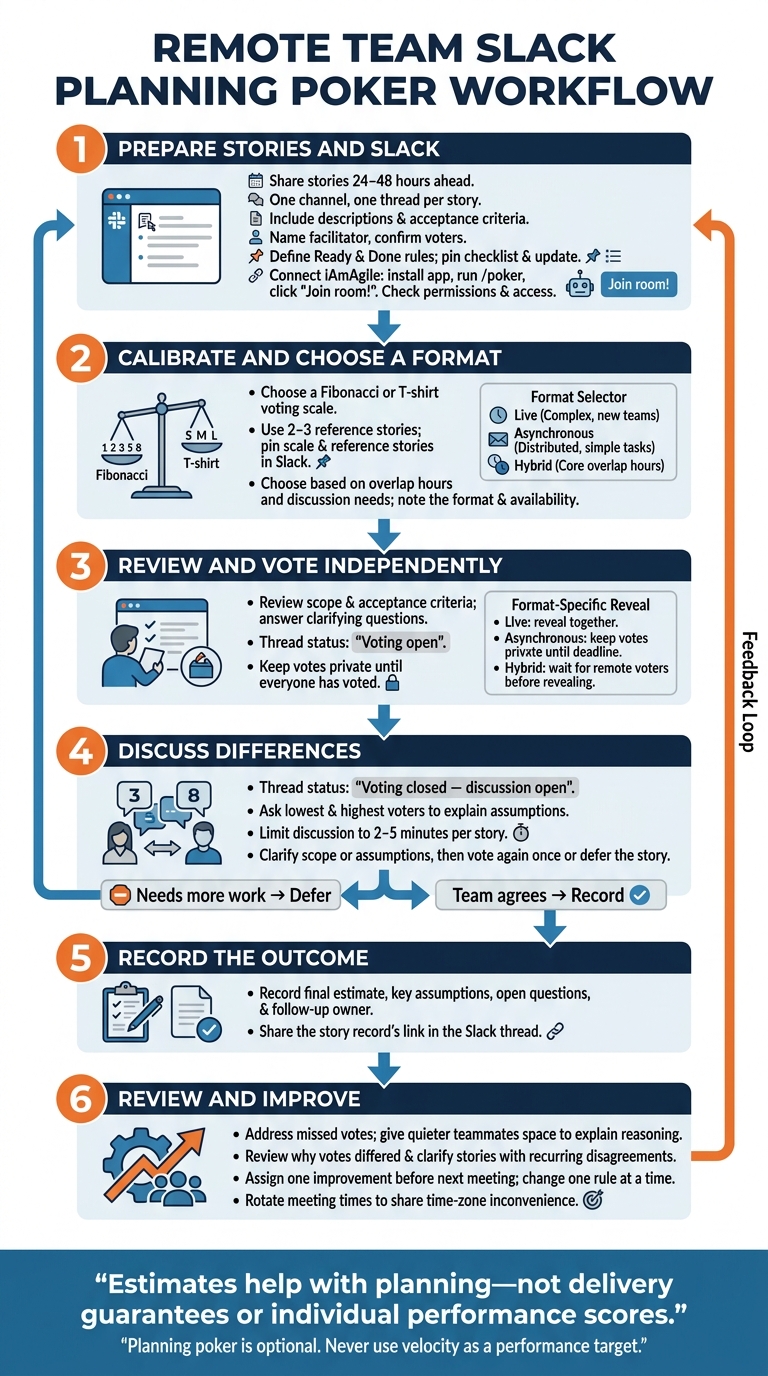
Slack Planning Poker Workflow for Remote Teams
Planning Poker Explained | How Agile Teams Estimate Work Effectively
Prepare Slack and iAmAgile for Estimation
With the rules in place, set up Slack to keep voting organized.
Set Up the Channel, Roles, and Stories
Use one Slack channel and one thread per story so questions and decisions stay together.
Give each story a description and acceptance criteria. Before voting, define the team’s Ready and Done rules. Pin the readiness checklist in the channel so everyone uses the same rules, and update it before each session.
| Requirement | Owner | Slack location | Completion status |
|---|---|---|---|
| Select team channel and install iAmAgile | Facilitator | #team-channel | [ ] |
| Name facilitator and confirm voters | Team | #team-channel | [ ] |
| Define Ready and Done rules | Team | Pinned message | [ ] |
| Prepare stories with acceptance criteria | Product Owner | Story thread | [ ] |
| Post stories in the story thread before voting | Product Owner | Story thread | [ ] |
| Set voting scale (Fibonacci or T-shirt) | Facilitator | iAmAgile room | [ ] |
Connect iAmAgile and Choose a Voting Scale
iAmAgile offers Slack-integrated planning poker with customizable voting scales and mobile access. Install the app in your Slack workspace, run /poker in any channel, and click “Join room!” to enter. Check the required permissions and make sure participants have access before the first session.
Calibrate the scale with 2–3 familiar baseline stories. Pin both the scale and reference stories in Slack so the team estimates against the same baseline.
Choose a Live, Asynchronous, or Hybrid Format
| Format | Participation | Speed | Time-zone flexibility | Discussion quality | Best use |
|---|---|---|---|---|---|
| Live | High | Fast | Low | High | Complex stories, new teams |
| Asynchronous | Flexible | Slow | High | Moderate | Distributed teams, simple tasks |
| Hybrid | Mixed | Moderate | Moderate | Moderate | Teams with core overlap hours |
Choose the format based on your team’s overlap hours and how much discussion the stories need. Add the format to the calendar invite and note team availability in Slack.
Run a Slack Poker Session
Follow the same three-step flow for every story: vote, discuss, record. Once setup is complete, move from private votes to an open discussion, then record the outcome in Slack.
1. Review the Story and Vote Independently
Review the story’s scope and acceptance criteria. Answer any clarifying questions before opening the vote.
Post Voting open in the story thread. For live sessions, reveal votes together. For asynchronous sessions, keep votes private until the deadline. For hybrid sessions, wait for remote voters before showing the results.
2. Discuss Differences and Vote Again
Post Voting closed - discussion open in the thread. Ask the people who cast the lowest and highest votes to explain their assumptions.
Once you’ve clarified the scope or assumptions, vote again once or defer the story.
3. Record the Estimate and Next Steps
When the team agrees, add the final estimate, key assumptions, open questions, and follow-up owner to the story record. Share the record’s link in the Slack thread.
Fix Common Problems and Improve Estimation
Use each session’s final estimate, assumptions, and open questions to guide the next session.
Fix Voting and Participation Problems
Send Slack nudges to inactive voters during live and asynchronous sessions. Use reactions to confirm agreement without pushing everyone toward consensus.
After the session, check for recurring reasons behind disagreements.
Review Patterns Without Setting Velocity Targets
Look for repeated outlier votes and use them to make stories clearer. Keep estimates separate from priority, capacity, and delivery commitments. Never use velocity as a performance target.
Run a Short Estimation Retro
Hold a brief estimation retro after the session. Record why votes differed, then assign one improvement to work on before the next meeting.
Conclusion: Make Slack Poker a Repeatable Process
Start with a few ready stories in iAmAgile. Use 2–3 reference stories to calibrate your voting scale so the team can follow the same process each session.
Keep votes independent and limit discussion to 2–5 minutes per story. Record the assumptions behind each estimate, and give quieter teammates space to explain their reasoning. Rotate meeting times so the same time zone doesn’t always bear the inconvenience.
Estimates help with planning - they aren’t delivery guarantees or individual performance scores. A consistent process makes remote estimation repeatable. Review each session, then change one rule at a time so you can see its effect.
FAQs
Who should vote in Slack poker?
Bring in developers for technical expertise, product owners to clarify requirements, and QA team members to flag testing challenges. Together, their input helps create well-rounded, unbiased, and accurate estimates. A facilitator, such as a Scrum Master, should also join to keep discussions on track.
With iAmAgile, you can invite team members directly into an estimation room via Slack, so everyone with relevant project knowledge can contribute.
What if we still disagree after revoting?
If your team still can’t agree after a revote, don’t let one item stall the session. Split the story into smaller tasks, set it aside for more refinement, or use the lowest estimate to keep things moving.
iAmAgile’s customizable voting scales and Slack integration help your team stay focused and productive as you move to the next item.
When should we reestimate a story?
Reestimate a story during planning when team members’ votes vary widely. The gap often points to different assumptions, misunderstood requirements, or complexity someone missed. Talk through those differences, clarify the details, and vote again to reach a consensus.
If the team still can’t agree after a few rounds of discussion and voting, split the story into smaller pieces or set it aside for further refinement.
Ready to improve your team's planning?
Put what you've learned into practice! Make your next planning session more engaging and accurate.
Try for free - no signup required